
I'm Motebang (aka Fongfong). I'm a software engineer with an interest in the Node.js related tech stack.
Experience in climate data management, music data analytics and a specialty in immersive audio.
Overview
JavaScript was traditionally a scripting and browser language that never saw a light of day on the backend. It was used primarily for authoring web pages, but only until Node.js came along. Node.js brought a shift from just a browser language to the back-end. It was then suddenly possible to use JavaScript to author web servers as well. There are a couple of benefits that spawn with Node.js. It meant a developer could use one language across an entire development stack - from front-end to back-end, leading to faster development cycle since a developer does not have to switch between programming languages. Further, the relative simplicity of adopting JavaScript as a programming language compared to other languages fuels the popularity of Node.js. I started using Node.js in 2015 when I started my masters research. I built a web server with Node.js, and a web client which acted as a controller to a low-latency immersive audio (built with C++) streaming application, and I've never stopped using it.
Features:
Event-driven: The notion of events drives the whole design of Node.js. All of its core modules are event-driven. Events are simply actions occurring in the universe of an application, therefore requiring a reaction.
Asynchronous: Node.js is non-blocking. It uses the event loop to circumvent the blocking input/output operations should they arise. Blocking operations cause the execution of an application to wait for the operation to complete, before proceeding to the next instructions. Non-blocking operations, on the other hand, do not wait of the program execution. They instead pass callbacks to the operation, and continue to subsequent instructions. The callback handles the completion of the function that was passed to it.
Highly scalable: JavaScript is single-threaded, and so Node.js follows the single-threaded paradigm. So what makes a runtime that runs a single thread not slow? The asynchronous nature of Node.js, and more interestingly, the concepts of the worker_threads and cluster modules.
Easy of use: Node.js uses JavaScript (and TypeScript, which compiles to JavaScript prior to execution). This means you can write all types of apps using just one language - JavaScript! This increases adoption of back-end development by traditionally front-end developers.
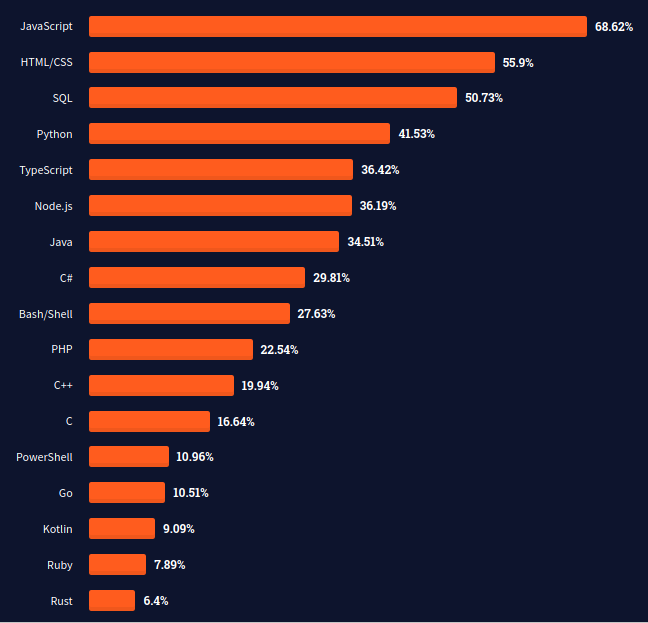
Of course there are plenty of other great features for Node.js, such as being open-source, cross-platform, light and blazing fast. But the ones I've listed are - in my own opinion - great drivers for the popularity and success of Node.js shown in the screenshot of Stack Overflow 2021 survey below
Problem Domains
A prevalent use of Node.js seems to occur on the web. But that's not the only place where Node.js can be used. The following are various areas where Node.js applications seem to be prominent.
Streaming: Applications that serve data, such as Netflix or Spotify, need to send data in small chunks for network speed and efficiency - as opposed to sending one whole big package - to its clients. Node.js outdoes itself in this area.
Real-time: Node.js also fares well in creating instant messaging applications such as chats.
Single-page-applications (SPAs): Perhaps the proliferation of single-page-applications was popularized by various JavaScript libraries such as React, Angular, Ember, Vue and others. All these work well with Node.js.
Internet of Things (IoT): Smart devices are popping up everywhere, and the need to connect and control them remotely seamlessly opens up a niche for Node.js, and it integrates with IoT protocols.
Microservices: Microservices are to applications, what modules are to Node.js. You add small bits of features as desired, and as isolated as possible - the concept commonly known as modularity.
Command line interface (CLI): CLI applications can be written in JavaScript and run with Node.js too. Typically, servers run as CLI applications to preserve the so-much-needed resources for handling client requests.
Cloud: Big guns in the cloud domain have embraced Node.js. Many of their services work extremely well with it. These include AWS, GCP, Azure, and many others.
Web3: Due to its proven versatility, Node.js also has a stake in the new web3 hype that is disrupting currencies.
Components
Node.js has a very rich and vibrant ecosystem - thousands of JS and TS packages empowering this great runtime, built by thousands of dedicated developers and tonnes of companies - big and small - globally.
A few things are worth noting if you wanna get started with Node.js.
Packages
Developers design and build their own functionalities on top of Node.js to serve various use cases, and package them as little libraries called packages. This talks to Node.js also being extensible. The developer can then decide to use this package privately, or let others gain benefits of their hard labor by making it publicly available. Say hi 👋 in the comments with my npm greeting package.
Online registry
Then comes the npm registry. This is an online repository of Node.js packages. It hosts over a million packages. Anyone can search the registry for packages they'd like to incorporate in their project. But what happens when you find one that interests you?
CLI tool
During the installation of Node.js, the npm cli tool also gets installed. To use a package of interest, you first need to download it with the tool. This happens during the development phase, by running a command that downloads the package onto a local environment. For example, to add the in-memory data store Redis client as a project dependency, you run the following command in your terminal:
$ npm install redis
This will add redis as a dependency in your project.
Of course as with any CLI commands, npm CLI has many options and help. For instance, an option specified by a -g exists to add the package globally, i.e. have the package available anywhere on your local machine. You can also specify a package that you only need to run during the development phase of your project, and not used for production, such as a testing package Jest. This option is specified with a --save-dev flag. You can read more on the CLI commands at the npm docs site. NPM has an alternative called Yarn.
Package.json
Perhaps the most important component of any Node.js project - the package.json file - is a manifest file that contains project metadata. It stores information useful for the project, including dependencies (core and development types), name, version, author, among other fields.
Project Steps
A basic method for creating a Node.js project is using the initialization command of npm cli in an empty project directory, passing information that defines the project i.e. the project metadata that will be stored in the package.json file.
Initialization:
To get a project up and running, simply run the following command in a newly created directory:
$ npm init -y
The -y flag is a shortcut for a yes option that instructs the tool to accept default values to the questions you'd otherwise have to reply to if the flag is not passed.
Source Code
You'd then have to create files which will contain your application logic written, of course, in JavaScript (or TypeScript if you wish). It could be a server.js if you are writing some sort of a server, or an index.js.
Running a Program
When you have finished writing your logic, you save it and run the code by invoking the Node.js command and passing the file that contains your source code as follows:
$ node server.js
The above command is the simplest you can start running a Node.js program on the command line. It should get your server up and running. To quit or stop the program, simply press Ctrl + C.
This also happens to be a great place to test and debug your program amongst other things.
Publishing Your Program
Depending on your use case, you may want to make your program available to others for use. I've already described one way of doing this (as packages), or if it is a server like in the immediately above example, you could host it as a web server. There are plenty of Node.js hosting platforms you can utilize such as Vercel, AWS, Heroku, and others.
There are more powerful and formal approaches and practices for creating robust software. These follow more standard phases of the software development life cycle and include methodologies such as waterfall, agile, devops and many others. What I explained above is not any of this, it's just to get you quickly up and running with a basic Node.js project.
Conclusion
All the listed benefits and features of Node.js have turned it into a popular and great option for building interesting and powerful web applications. You can also use Node.js to start something interesting, or powerful - who knows, and provide some form of service using this great tool!
PS: Ryan Dahl - Node.js creator, created yet another runtime called Deno, to fix various problematic aspects about Node.js.
#thw-web-apps #node.js #web
